
 Spring Cloud Gateway
# 什么是Spring Cloud Gateway
网关作为流量的入口,常用的功能包括路由转发,权限校验,限流等。
- Spring Cloud Gateway 是Spring Cloud官方推出的第二代网关框架,定位于取代 Netflix Zuul。相比 Zuul 来说,Spring Cloud Gateway 提供更优秀的性能,更强大的有功能。
- Spring Cloud Gateway 是由 WebFlux + Netty + Reactor 实现的响应式的 API 网关。它不能在传统的 servlet 容器中工作,也不能构建成 war 包**。**
- Spring Cloud Gateway 旨在为微服务架构提供一种简单且有效的 API 路由的管理方式,并基于 Filter 的方式提供网关的基本功能,例如说安全认证、监控、限流等等。
# 核心概念
- 路由(route)
- 路由是网关中最基础的部分,路由信息包括一个ID、一个目的URI、一组断言工厂、一组Filter组成。如果断言为真,则说明请求的URL和配置的路由匹配。
- 断言(predicates)
- Java8中的断言函数,SpringCloud Gateway中的断言函数类型是Spring5.0框架中的ServerWebExchange。断言函数允许开发者去定义匹配Http request中的任何信息,比如请求头和参数等。
- 过滤器(Filter)
- SpringCloud Gateway中的filter分为Gateway FilIer和Global Filter。Filter可以对请求和响应进行处理。
# 工作原理
Spring Cloud Gateway 的工作原理跟 Zuul 的差不多,最大的区别就是 Gateway 的 Filter 只有 pre 和 post 两种。
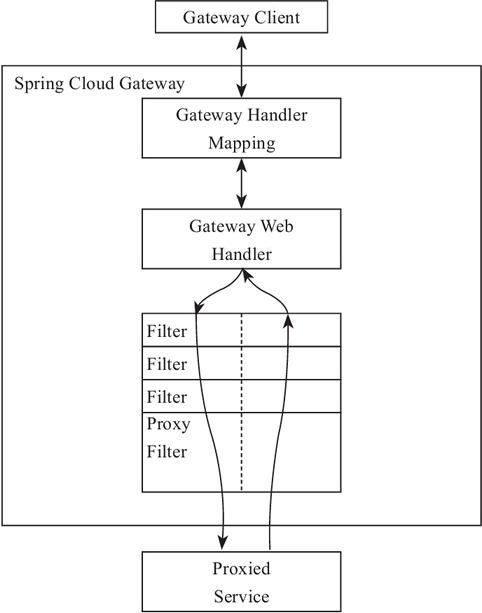
客户端向 Spring Cloud Gateway 发出请求,如果请求与网关程序定义的路由匹配,则该请求就会被发送到网关 Web 处理程序,此时处理程序运行特定的请求过滤器链。
过滤器之间用虚线分开的原因是过滤器可能会在发送代理请求的前后执行逻辑。所有 pre 过滤器逻辑先执行,然后执行代理请求;代理请求完成后,执行 post 过滤器逻辑。
# Spring Cloud Gateway快速开始
官方API地址: (opens new window) https://docs.spring.io/spring-cloud-gateway/docs/current/reference/html/#gatewayfilter-factories
# 环境信息
<spring-cloud.version>Hoxton.SR8</spring-cloud.version>
<spring-cloud-alibaba.version>2.2.5.RELEASE</spring-cloud-alibaba.version>
    <dependencyManagement>
        <dependencies>
            <dependency>
                <groupId>org.springframework.cloud</groupId>
                <artifactId>spring-cloud-dependencies</artifactId>
                <version>${spring-cloud.version}</version>
                <type>pom</type>
                <scope>import</scope>
            </dependency>
            <dependency>
                <groupId>com.alibaba.cloud</groupId>
                <artifactId>spring-cloud-alibaba-dependencies</artifactId>
                <version>${spring-cloud-alibaba.version}</version>
                <type>pom</type>
                <scope>import</scope>
            </dependency>
        </dependencies>
    </dependencyManagement>
    <parent>
        <groupId>org.springframework.boot</groupId>
        <artifactId>spring-boot-starter-parent</artifactId>
        <version>2.3.2.RELEASE</version>
        <relativePath/> <!-- lookup parent from repository -->
    </parent>

    <!-- gateway网关 -->
    <dependency>
        <groupId>org.springframework.cloud</groupId>
        <artifactId>spring-cloud-starter-gateway</artifactId>
    </dependency>

    <!-- nacos服务注册与发现 -->
    <dependency>
        <groupId>com.alibaba.cloud</groupId>
        <artifactId>spring-cloud-starter-alibaba-nacos-discovery</artifactId>
    </dependency>
	<!-- nacos配置中心 -->
	<dependency>
    	<groupId>com.alibaba.cloud</groupId>
    	<artifactId>spring-cloud-starter-alibaba-nacos-config</artifactId>
	</dependency>
2
3
4
5
6
7
8
9
10
11
12
13
14
15
16
17
18
19
20
21
22
23
24
25
26
27
28
29
30
31
32
33
34
35
36
37
38
39
40
41
42
43
注意
注意:会和spring-webmvc的依赖冲突,需要排除spring-webmvc
# 配置信息
server:
  port: 8888
spring:
  application:
    name: felix-gateway
  #配置nacos注册中心地址
  cloud:
    nacos:
      discovery:
        server-addr: 127.0.0.1:8848
        namespace: c260f654-2e3c-4bc1-a3f0-8e9d18ad31dc
      #配置nacos配置中心地址
      config:
        server-addr: 127.0.0.1:8848
        namespace: c260f654-2e3c-4bc1-a3f0-8e9d18ad31dc

    gateway:
      discovery:
        locator:
          # 默认为false,设为true开启通过微服务创建路由的功能,即可以通过微服务名访问服务
          # http://localhost:8888/felix-order/order/getUserById/1
          enabled: true
      # 是否开启网关
      enabled: true
2
3
4
5
6
7
8
9
10
11
12
13
14
15
16
17
18
19
20
21
22
23
24
# 路由断言工厂(Route Predicate Factories)配置
# 示例
spring:
  cloud:
    gateway:
      #设置路由:路由id、路由到微服务的uri、断言
      routes:
      - id: felix_order_route  #路由ID,全局唯一
        uri: http://localhost:8080  #目标微服务的请求地址和端口
        predicates: #断言标识
        # 匹配在指定的日期时间范围内发生的请求  入参是ZonedDateTime类型
        # -Before 指定时间之前 -After 指定时间之后
        # 时间获取方式 ZonedDateTime zonedDateTime2 = ZonedDateTime.now(ZoneId.of("Asia/Shanghai"));
        - Between=2022-07-20T10:00:00.777+08:00[Asia/Shanghai],2022-07-21T10:00:00.777+08:00[Asia/Shanghai]
        # Cookie匹配
        - Cookie=username,felix
        # 请求头Header匹配 请求中带有请求头名为 x-request-id,其值与 \d+ 正则表达式匹配
     	- Header=X-Request-Id, \d+
     	# 路径匹配 # 测试:http://localhost:8080/order/findOrderByUserId/1
        - Path=/order/**   #Path路径匹配
2
3
4
5
6
7
8
9
10
11
12
13
14
15
16
17
18
# 自定义路由断言工厂
自定义路由断言工厂需要继承 AbstractRoutePredicateFactory 类,重写 apply 方法的逻辑。在 apply 方法中可以通过 exchange.getRequest() 拿到 ServerHttpRequest 对象,从而可以获取到请求的参数、请求方式、请求头等信息。
提示
注意:命名需要以 RoutePredicateFactory 结尾
@Component
@Slf4j
public class FelixAuthRoutePredicateFactory extends AbstractRoutePredicateFactory<FelixRoutePredicateFactory.Config> {

    public FelixAuthRoutePredicateFactory() {
        super(Config.class);
    }

    @Override
    public Predicate<ServerWebExchange> apply(Config config) {
        return new GatewayPredicate() {

            @Override
            public boolean test(ServerWebExchange serverWebExchange) {
                log.info("调用FelixAuthRoutePredicateFactory" + config.getName());
                if(config.getName().equals("felix")){
                    return true;
                }
                return false;
            }
        };
    }

    /**
     * 快捷配置
     * @return
     */
    @Override
    public List<String> shortcutFieldOrder() {
        return Collections.singletonList("name");
    }

    public static class Config {

        private String name;

        public String getName() {
            return name;
        }

        public void setName(String name) {
            this.name = name;
        }
    }
}
2
3
4
5
6
7
8
9
10
11
12
13
14
15
16
17
18
19
20
21
22
23
24
25
26
27
28
29
30
31
32
33
34
35
36
37
38
39
40
41
42
43
44
45
配置
spring:
  cloud:
    gateway:
      #设置路由:路由id、路由到微服务的uri、断言
      routes:
      - id: felix_order_route  #路由ID,全局唯一
        uri: http://localhost:8080  #目标微服务的请求地址和端口
        predicates: #断言标识
        #自定义FelixAuth断言工厂 方式1
#        - name: FelixAuth
#          args:
#            name: felix
# 		方式2
        - FelixAuth=felix
2
3
4
5
6
7
8
9
10
11
12
13
14
# 过滤器工厂( GatewayFilter Factories)配置
SpringCloudGateway 内置了很多的过滤器工厂,我们通过一些过滤器工厂可以进行一些业务逻辑处理器,比如添加剔除响应头,添加去除参数等
# 示例:
spring:
  cloud:
    gateway:
      #设置路由:路由id、路由到微服务的uri、断言
      routes:
      - id: felix_order_route  #路由ID,全局唯一
        uri: http://localhost:8080  #目标微服务的请求地址和端口
        #配置过滤器工厂
        filters:
        - AddRequestHeader=X-Request-color, red  #添加请求头
        - AddRequestParameter=color, blue  # 添加请求参数
        - PrefixPath=/mall-order  # 添加前缀 对应微服务需要配置context-path
        - RedirectTo=302, https://www.baidu.com/  #重定向到百度
2
3
4
5
6
7
8
9
10
11
12
13
# 自定义过滤器工厂
继承AbstractNameValueGatewayFilterFactory且我们的自定义名称必须要以GatewayFilterFactory结尾并交给spring管理。
@Component
@Slf4j
public class FelixAuthGatewayFilterFactory extends AbstractNameValueGatewayFilterFactory {

    @Override
    public GatewayFilter apply(NameValueConfig config) {
        return (exchange, chain) -> {
            log.info("调用FelixAuthGatewayFilterFactory==="
                    + config.getName() + ":" + config.getValue());
            return chain.filter(exchange);
        };
    }
}
2
3
4
5
6
7
8
9
10
11
12
13
配置
spring:
  cloud:
    gateway:
      #设置路由:路由id、路由到微服务的uri、断言
      routes:
      - id: order_route  #路由ID,全局唯一
        uri: http://localhost:8020  #目标微服务的请求地址和端口
        #配置过滤器工厂
        filters:
        - FelixAuth=fox,男
2
3
4
5
6
7
8
9
10
# 全局过滤器(Global Filters)配置
GlobalFilter 接口和 GatewayFilter 有一样的接口定义,只不过, GlobalFilter 会作用于所有路由。
官方声明:GlobalFilter的接口定义以及用法在未来的版本可能会发生变化。
# 自定义全局过滤器
@Component
@Order(-1)
@Slf4j
public class FelixAuthFilter implements GlobalFilter {
    @Override
    public Mono<Void> filter(ServerWebExchange exchange, GatewayFilterChain chain) {
        //校验请求头中的token
        List<String> token = exchange.getRequest().getHeaders().get("token");
        log.info("token:"+ token);
        if (token.isEmpty()){
            return null;
        }
        return chain.filter(exchange);
    }
}

@Component
public class FelixIPFilter implements GlobalFilter, Ordered {

    @Override
    public int getOrder() {
        return 0;
    }

    @Override
    public Mono<Void> filter(ServerWebExchange exchange, GatewayFilterChain chain) {
        HttpHeaders headers = exchange.getRequest().getHeaders();
        //模拟对 IP 的访问限制,即不在 IP 白名单中就不能调用的需求
        if (getIp(headers).equals("127.0.0.1")) {
            return null;
        }
        return chain.filter(exchange);
    }

    private String getIp(HttpHeaders headers) {
        return headers.getHost().getHostName();
    }
}
2
3
4
5
6
7
8
9
10
11
12
13
14
15
16
17
18
19
20
21
22
23
24
25
26
27
28
29
30
31
32
33
34
35
36
37
38
# Gateway跨域配置(CORS Configuration)
spring:
  cloud:
    gateway:
        globalcors:
          cors-configurations:
            '[/**]':
              allowedOrigins: "*"
              allowedMethods:
              - GET
              - POST
              - DELETE
              - PUT
              - OPTION
2
3
4
5
6
7
8
9
10
11
12
13
# gateway整合sentinel限流
引入依赖
<!-- gateway接入sentinel  -->
<dependency>
	<groupId>com.alibaba.cloud</groupId>
	<artifactId>spring-cloud-alibaba-sentinel-gateway</artifactId>
</dependency>
<dependency>
	<groupId>com.alibaba.cloud</groupId>
	<artifactId>spring-cloud-starter-alibaba-sentinel</artifactId>
</dependency>
2
3
4
5
6
7
8
9
接入sentinel dashboard,添加yml配置
server:
  port: 8888
spring:
  application:
    name: felix-gateway
  #配置nacos注册中心地址
  cloud:
    nacos:
      discovery:
        server-addr: 127.0.0.1:8848
        namespace: c260f654-2e3c-4bc1-a3f0-8e9d18ad31dc
      #配置nacos配置中心地址
      config:
        server-addr: 127.0.0.1:8848
        namespace: c260f654-2e3c-4bc1-a3f0-8e9d18ad31dc

    sentinel:
      transport:
        # 添加sentinel的控制台地址
        dashboard: 127.0.0.1:8080
2
3
4
5
6
7
8
9
10
11
12
13
14
15
16
17
18
19
20